ReadFlow - Between the Covers
Template Notion pentru tracking cărți, sesiuni de citire și notițe





More than 127 people bought this template
Track what you read. Remember why it mattered.
ReadFlow is a complete book-tracking system in Notion for readers who want more than a simple list. It automatically tracks your reading time, captures the thoughts that stay with you, and visualizes your progress – all in one place.
Who is ReadFlow for?
For readers who:
-
Want to know exactly how much time they invest in reading
-
Want to keep important ideas and passages
-
Are looking for a system that makes reading feel natural, without manual logging
-
Read together with their partner and want to track progress separately
What does the template include?
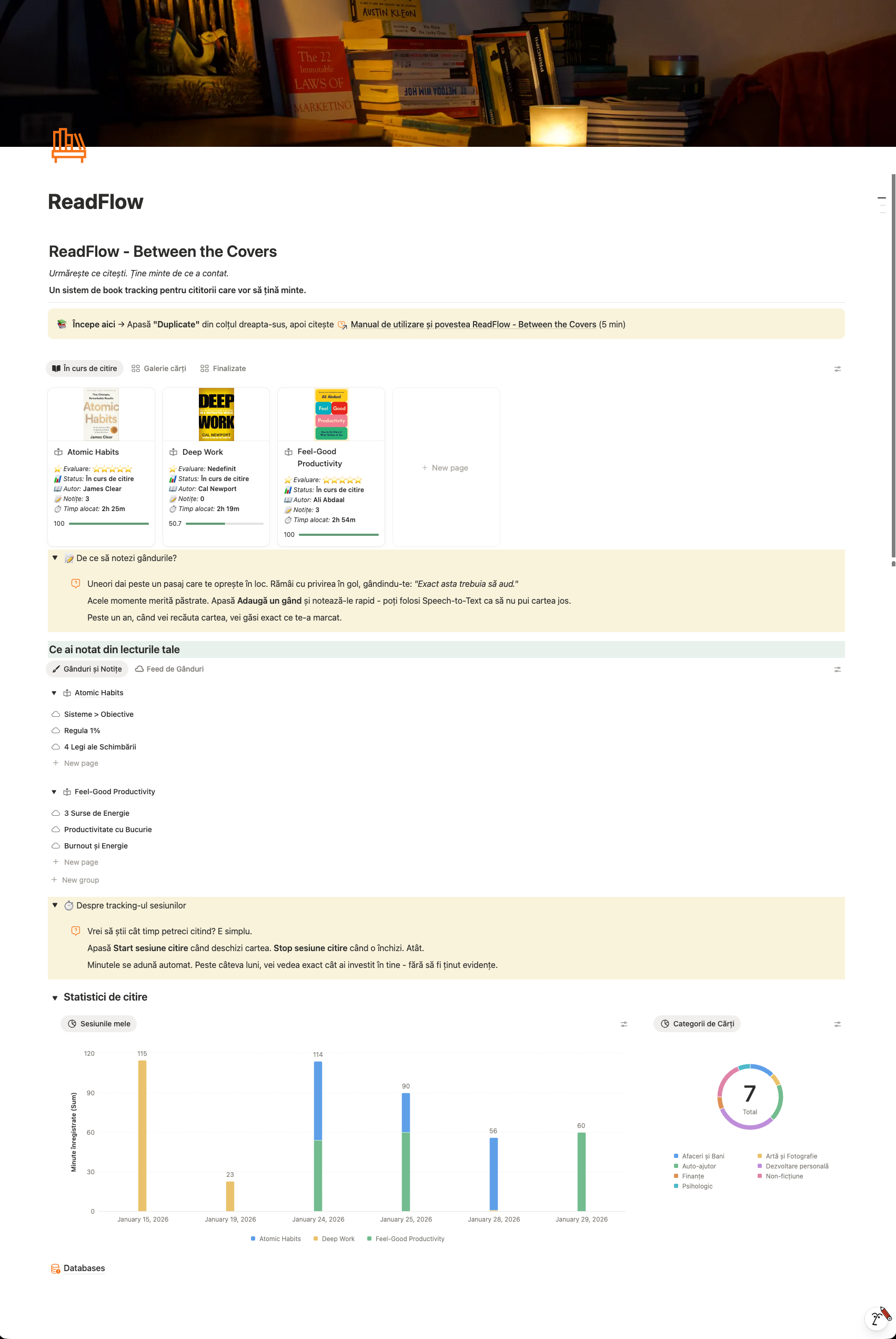
📚 Books database – with status, rating, author, category, and visual progress
💭 Thoughts & Notes system – automatically linked to each book
⏱️ Reading session tracking – Start/Stop with a single click, minutes are calculated automatically
📊 Stats and charts – daily view and distribution by categories
📖 User guide – complete walkthrough included (5 minutes to read)
How does it work?
-
Add a book to your library
-
Press Start session when you open the book
-
Press Stop session when you close it
-
Add a thought when you come across a passage that moves you
That’s it. The system automatically calculates minutes, updates the status, and keeps everything you write. In a year, you’ll see exactly how many hours you’ve read, which books you enjoyed, and which ideas you wanted to keep.
What do you see for each book?
-
⭐ Rating – know what’s worth rereading
-
📊 Status – To Read, In Progress, Finished
-
✍ Author – quick context
-
📝 Notes – how many thoughts you’ve captured
-
⏱️ Time spent – total minutes invested
-
📈 Progress – visual completion bar
For couples and families
Reading together? Each person starts and stops their own sessions. Minutes are counted individually. Turn reading into a friendly competition – who gets to 1,000 minutes first?
Technical requirements
The template works on any Notion plan. The automatic buttons (Start session, Stop session, Add a thought) require a paid Notion plan (Plus, Business, or Enterprise). On the free plan, you can manually add sessions and notes.
Why ReadFlow?
The number of books you read isn’t everything. The difference between reading 100 books and remembering nothing, versus reading 5 and applying all of them, lies in your system.
ReadFlow is not just another book tracker. It’s a system that makes reading feel natural – and shows you not just what you read, but how it changed you.
What you get:
✅ Complete Notion template, ready to use
✅ 4 interconnected databases
✅ Automatic tracking buttons
✅ Built-in charts and stats
✅ User guide in English
✅ Free updates
How to get started:
-
Purchase the template
-
Click “Duplicate” in Notion
-
Read the manual (5 minutes)
-
Add your first book and press Start
20 minutes today. 20 tomorrow. In a month, you’ve read 10 hours. In a year, 120 hours. Without even feeling it.
Similar templates
Explore other templates you might like